Spoolman アドオン
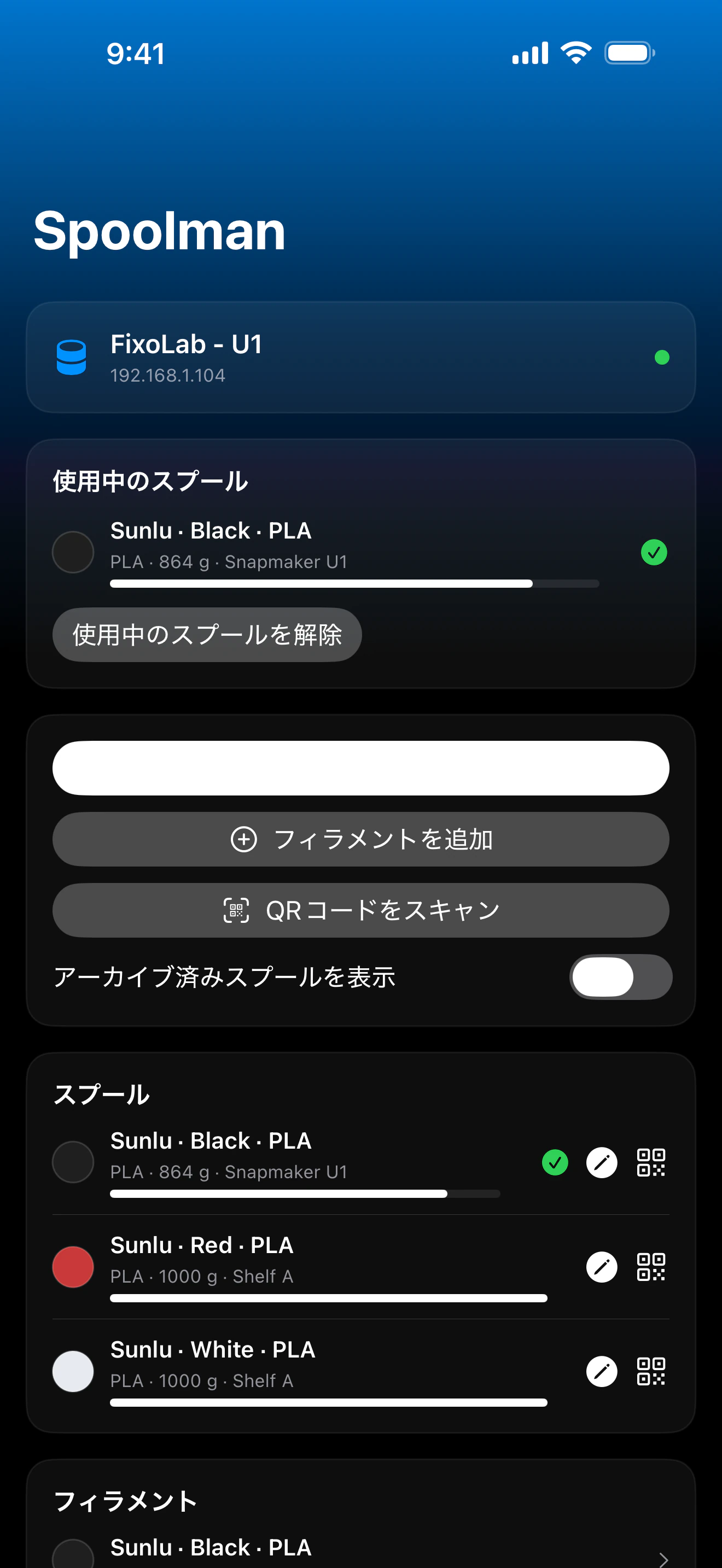
Printer Toolsから直接、Klipperプリンターのフィラメントスプールを管理し、アクティブなスプールを設定
Printer Toolsは、MainsailやFluiddが使用するのと同じプロキシである、プリンター自体のMoonrakerインスタンスを通じてSpoolmanと通信するため、別途Spoolman接続やアカウントを用意する必要はありません。スプール、フィラメント、ベンダーを閲覧し、手動またはQRコードのスキャンでアクティブなスプールを設定し、印刷後に残量を更新できます。
対応デバイス
Any Klipper printer with Moonraker and a Spoolman server configured
接続とプロトコル
| 通信方式 | MoonrakerのSpoolmanプロキシ(HTTP)、Klipperプリンターと同じ接続を使用 |
| 認証 | 構成が必要とする場合はMoonraker APIキー |
| 要件 | Printer Toolsにすでに追加済みのKlipperプリンターで、稼働中のSpoolmanサーバーに対してMoonrakerのSpoolmanモジュールが設定されていること |
| 外出先 | ネットワークにVPN接続するか、OctoEverywhereを追加してください |
現在検証されている内容
- ✓ダッシュボードに表示されるアクティブなスプールと、それを変更するためのショートカット
- ✓ベンダー、フィラメント、残量を含むスプール一覧(アーカイブ済みスプールも含む)
- ✓リストから選択するか、QRコードをスキャンしてアクティブなスプールを設定
- ✓計測した総重量を入力してスプールの残量を更新
- ✓Printer Toolsから直接新しいベンダーを作成
機能マトリックス
| 機能 | 状態 | 備考 |
|---|---|---|
| 接続と検出 | 対応 | Klipperプリンター自体のMoonraker接続を使用します;別途Spoolmanのアカウントやアドレスを設定する必要はありません。 |
| ライブテレメトリー | 対応 | アクティブなスプール、残量、フィラメント、ベンダーがダッシュボードに表示されます。 |
| リモート制御 | 対応 | リストまたはQRコードでアクティブなスプールを設定し、新しい総重量を記録し、ベンダーを作成できます。 |
| 複数デバイス | 対応 | Spoolmanサーバーが設定されている、追加済みのすべてのKlipperプリンターで独立して動作します。 |
既知の制限
- !Printer Toolsにすでに接続済みのKlipperプリンターで、稼働中のSpoolmanサーバーに対してMoonrakerのSpoolmanモジュールが設定されている必要があります;単独の接続ではありません。
- !フィラメントとベンダーのカタログ項目はSpoolman自体で管理されます;Printer Toolsはスプールの読み取りと更新を行いますが、カタログの完全な編集はSpoolman自体のインターフェースで行う必要があります。
- !QRコードスキャンは、Spoolman自体の`web+spoolman:s-<id>`形式を前提としています。
よくある質問
別途Spoolmanのアカウントやアドレスが必要ですか?
いいえ。Printer ToolsはKlipperプリンターの既存のMoonraker接続を再利用し、MainsailやFluiddと同じ方法で、Moonraker自体のプロキシを通じてSpoolmanと通信します。
Printer Toolsからアクティブなスプールを変更できますか?
はい、スプール一覧から選択するか、QRコード(Spoolmanの標準的な`web+spoolman:s-<id>`形式)をスキャンしてアクティブに設定できます。
スプールに残っているフィラメントの量を更新できますか?
はい、計測したスプールの総重量を入力すると、Printer ToolsがそれをSpoolmanに送信し、残りのフィラメント量を再計算します。
Spoolmanをインストールしていなくても動作しますか?
いいえ、Moonrakerインスタンスに稼働中のSpoolmanサーバーの設定が必要です;それがないと、Klipper自体はフィラメントをネイティブに追跡しないため、フィラメントデータは利用できません。
対応プラットフォーム
iOSiPadOSmacOSAndroid
その他のアドオン
Printer Tools
Android、iOS、iPadOS、macOS、watchOSで利用可能