Дополнение BIGTREETECH
Отслеживайте и управляйте Panda PWR, Panda Touch и Panda Knomi по локальной сети
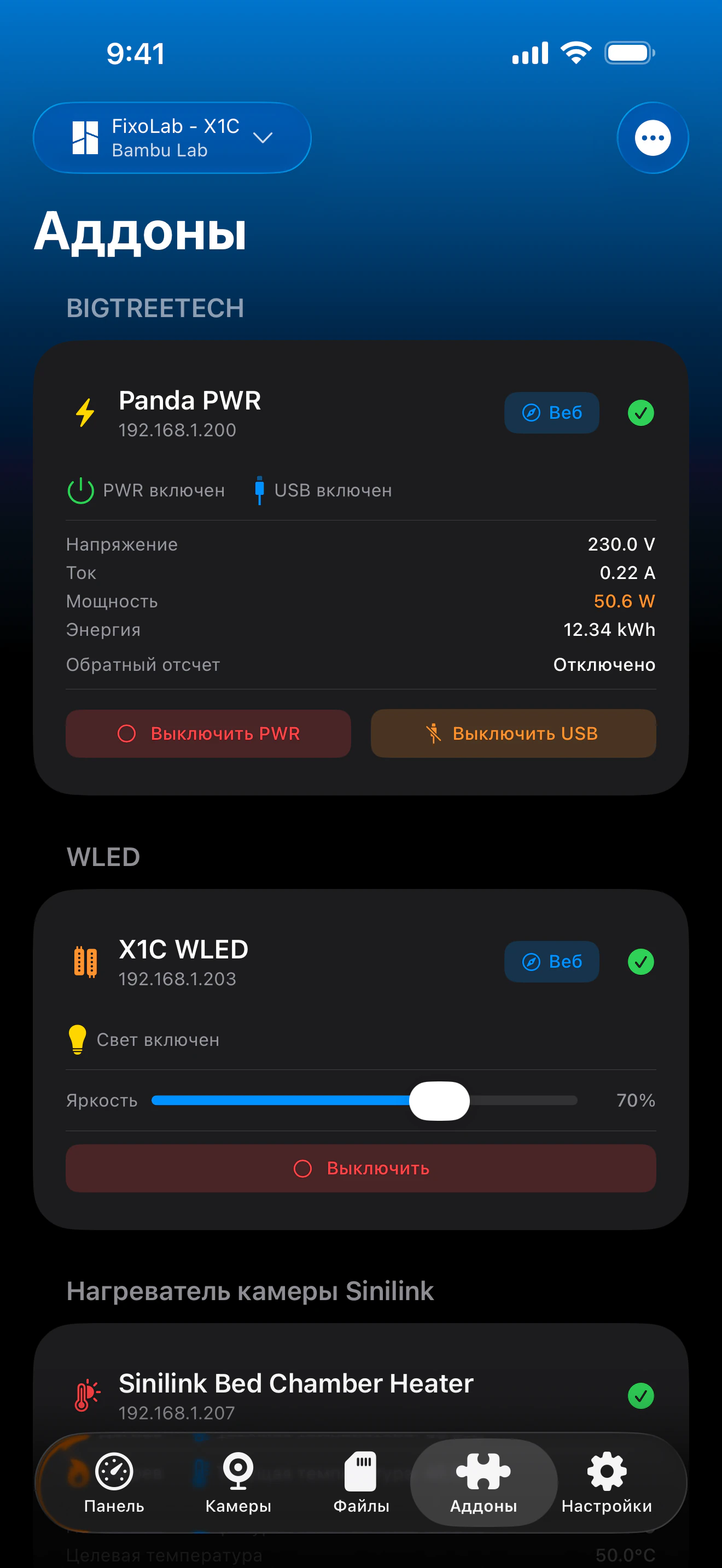
Printer Tools обменивается данными с аксессуарами Panda от BIGTREETECH по обычному HTTP в вашей локальной сети, используя те же конечные точки, что и собственный веб-интерфейс Panda PWR. Panda PWR предоставляет полный мониторинг и управление питанием, а Panda Touch и Panda Knomi обнаруживаются и отображаются как подключённые устройства рядом с вашими принтерами.
Поддерживаемые устройства
Подключение и протокол
| Транспорт | HTTP по LAN (Panda PWR); проверка присутствия по TCP для Panda Touch и Panda Knomi |
| Аутентификация | Отсутствует, устройства добавляются по локальному IP-адресу |
| Требования | Устройство Panda, доступное в вашей локальной сети |
| Вне дома | Подключитесь через VPN обратно к вашей сети |
Что подтверждено сегодня
- ✓Переключатели питания и USB для Panda PWR, приложение перепроверяет состояние после каждой команды
- ✓Показания напряжения, тока, мощности и энергопотребления Panda PWR
- ✓Управление таймером обратного отсчёта Panda PWR (старт, пауза, стоп) и переключатель автоотключения
- ✓Статус подключения Panda Touch и Panda Knomi рядом с другими устройствами
Матрица функций
| Функция | Статус | Примечания |
|---|---|---|
| Подключение и обнаружение | Доступно | Устройства добавляются по IP-адресу; Panda PWR опрашивается по HTTP, Panda Touch и Panda Knomi - через лёгкую проверку TCP. |
| Телеметрия в реальном времени | Доступно | Panda PWR передаёт данные о напряжении, токе, мощности и энергопотреблении. |
| Удалённое управление | Доступно | Питанием, USB и таймером обратного отсчёта Panda PWR можно управлять из Printer Tools. |
| Несколько устройств | Доступно | Добавляйте столько устройств Panda PWR, Panda Touch и Panda Knomi, сколько у вас есть. |
Известные ограничения
- !Panda Touch и Panda Knomi пока показывают только статус подключения, без телеметрии и управления для этих двух устройств.
- !Устройства настраиваются по локальному IP-адресу; облачного сопряжения или автообнаружения нет.
- !Энергопотребление сбрасывается на самом устройстве; Printer Tools не ведёт исторический график потребления.
Часто задаваемые вопросы
Нужна ли учётная запись BIGTREETECH для подключения устройства Panda?
Нет. Panda PWR, Panda Touch и Panda Knomi добавляются по их локальному IP-адресу, так же как вы бы обращались к собственному веб-интерфейсу Panda PWR, учётная запись или облачное сопряжение не требуются.
Могу ли я управлять Panda Touch или Panda Knomi из Printer Tools?
Пока нет. Сейчас Printer Tools показывает только их статус подключения; полную телеметрию и удалённое управление имеет только Panda PWR.
Чем я могу управлять на Panda PWR?
Питанием и выходом USB, таймером обратного отсчёта (старт, пауза или стоп) и автоотключением, а также показаниями напряжения, тока, мощности и энергопотребления в реальном времени.
Могу ли я обращаться к Panda PWR вне дома?
Да, подключитесь через VPN обратно к домашней сети, Panda PWR доступен только в вашей локальной сети, поэтому Printer Tools нужен такой же доступ к сети, как у браузера.
Доступно на
Другие дополнения
Доступно для Android, iOS, iPadOS, macOS и watchOS